Table of Contents
- What is an MVP and Why Founders Need This Approach
- Step 1: Define the Core Problem
- Step 2: Identify Your Target Users
- Step 3: Map the Core Features
- Step 4: Choose the Right Tech Stack
- Step 5: Design for Speed, Not Perfection
- Step 6: Build the MVP
- Step 7: Launch and Collect Feedback
- Step 8: Iterate Based on Data
- Common MVP Mistakes to Avoid
- How Much Does an MVP Cost?
- Frequently Asked Questions
What is an MVP and Why Founders Need This Approach
An MVP is the simplest version of your product that solves the core problem for early users. It's not a demo or a prototype. It's a real product with limited features that someone can actually use to accomplish a specific task.
Most founders make the same mistake: they build too much before talking to customers. They spend months perfecting features no one asked for, building features that never get used, and running out of money before the product finds product-market fit.
An MVP flips this approach. Release the smallest product that solves the core problem. Launch quickly. Get real feedback from real users. Then decide what to build next based on what customers actually need.
From our experience building 100+ products, the timeline is consistent: founders who launch their MVP in 8-12 weeks and start iterating based on user feedback reach product-market fit twice as fast as founders who spend 6-12 months perfecting a product in isolation.
This guide walks through the complete process of building an MVP, from defining your core problem through launching to beta users and iterating based on real feedback.
Step 1: Define the Core Problem
Before you write a single line of code, you need to be absolutely clear about the problem you're solving. Not the feature list. Not the product vision. The core problem.
The problem statement should be specific. Instead of "we're building a project management tool," ask: what's the specific workflow problem we're solving? Is it task tracking? Team collaboration? Resource scheduling? Timeline management?
For an MVP, you're solving one specific problem for one specific user segment. A SaaS founder building a project management tool might focus exclusively on task assignment and deadline tracking for small product teams. That's the MVP. Timeline management, resource allocation, and reporting can wait.
Define your core problem by talking to 10-15 potential users. Ask them about their current process, where it breaks down, what workarounds they use, and how much time the problem costs them. This conversation is not optional. You're validating that the problem is real and important enough to solve.
The output: a one-sentence problem statement that everyone on the team can articulate. "We help small product teams track and assign tasks without switching between five different tools."
Step 2: Identify Your Target Users
Your MVP is not for everyone. It's for a specific group of users with a specific problem.
Create early adopter personas. These are not fictional users created in a meeting. They're profiles based on the actual conversations you had in Step 1. What role do they have? What tools do they currently use? What's their technical comfort level? How much would solving this problem be worth to them?
Early adopters are not your typical customers. They're impatient, willing to use incomplete products, and excited about solving their problems. They'll give you honest feedback. They'll help you improve. They'll be forgiving of bugs and rough edges if the core solution works.
Identify 3-5 early adopter profiles and find 5-10 actual people who fit each profile. These are your beta users. You'll launch to them first. You'll talk to them frequently. Their feedback will shape your product development roadmap for the next year.
Step 3: Map the Core Features
Feature prioritization separates successful MVPs from products that never ship. There's a simple framework: MoSCoW.
Must Have. Features without which your product doesn't work. If you're building a project management tool focused on task assignment, "must have" features might be: create a task, assign it to a team member, set a deadline, mark it complete. Nothing else. No custom fields, no integrations, no reporting.
Should Have. Features that significantly improve the core experience but aren't essential. Maybe team members can add task descriptions or attach files. Maybe they can set priority levels. These features are on the roadmap, not in the MVP.
Could Have. Nice-to-have features that would be cool but aren't critical. Team notifications, task history, activity feeds. Build these after launch if metrics show they matter.
Won't Have (for now). Features you explicitly decide not to build in the MVP. Mobile apps, advanced analytics, Slack integration, time tracking. Be explicit about what's not happening. This prevents scope creep.
A solid MVP has 4-8 core features. Not 20. Not 50. You're not building a complete product. You're solving one problem extremely well.
Ready to Build Your MVP?
We've helped founders launch MVPs in 8-12 weeks with focused feature sets and proven go-to-market strategies.
Start Your MVP ProjectStep 4: Choose the Right Tech Stack
The tech stack doesn't determine whether your product succeeds or fails. The market does. But a smart tech choice gets you to launch faster.
Use frameworks and tools that accelerate MVP development. Next.js and React for web applications reduce development time dramatically. You get fast load times, great developer experience, and the ability to handle scaling later. Node.js on the backend pairs perfectly with React on the frontend.
For hosting, use managed services. AWS, Vercel, or DigitalOcean. You shouldn't be managing servers or databases. Focus on product. Let the infrastructure handle itself.
Use no-code and low-code tools where it makes sense. Database: use Supabase or Firebase instead of managing PostgreSQL yourself. Authentication: use Auth0 or Firebase Auth instead of building login from scratch. Payments: use Stripe instead of building a payment processor.
The decision tree is simple: if it's not a core differentiator, use an existing solution. Build only the parts that make your product unique. Everything else, buy or use a service.
Avoid premature optimization. Don't spend two weeks discussing whether to use MongoDB or PostgreSQL. Pick one. You can migrate later. You probably won't need to migrate. Focus on shipping.
Step 5: Design for Speed, Not Perfection
Design is not about beautiful pixel-perfect interfaces. It's about clear, functional user flows that people can understand and use immediately.
Use design systems and UI kits. Shadcn, Tailwind UI, or Material UI. Copy existing patterns people know. If users have used Figma or Asana, use similar navigation patterns. Familiar design reduces the learning curve.
Create wireframes, not mockups. Show functionality and information hierarchy. Use simple tools: Figma, Wireframe.cc, or even pen and paper. A wireframe takes 30 minutes. A pixel-perfect mockup takes three days. You don't need three days.
Focus on core workflows. Map the three most important user journeys. Create a task. Complete a task. View all tasks. Design those beautifully. The secondary workflows can be functional and plain.
No custom branding in the MVP. Use a simple color palette. Use system fonts. Spend one hour on logo and color choice. Ship the product. You can polish branding after launch when you know the product is actually solving a problem.
Step 6: Build the MVP
You have 8-12 weeks and a focused list of features. Now build.
Work in two-week sprints. Plan what you're shipping. Build it. Test it. Review it with users. Repeat. This pace keeps momentum. It prevents endless refinement and feature creeping.
Follow an agile approach. Daily standups, weekly reviews, bi-weekly demos to your early adopter group. You're not building in isolation. Feedback loops keep you on track.
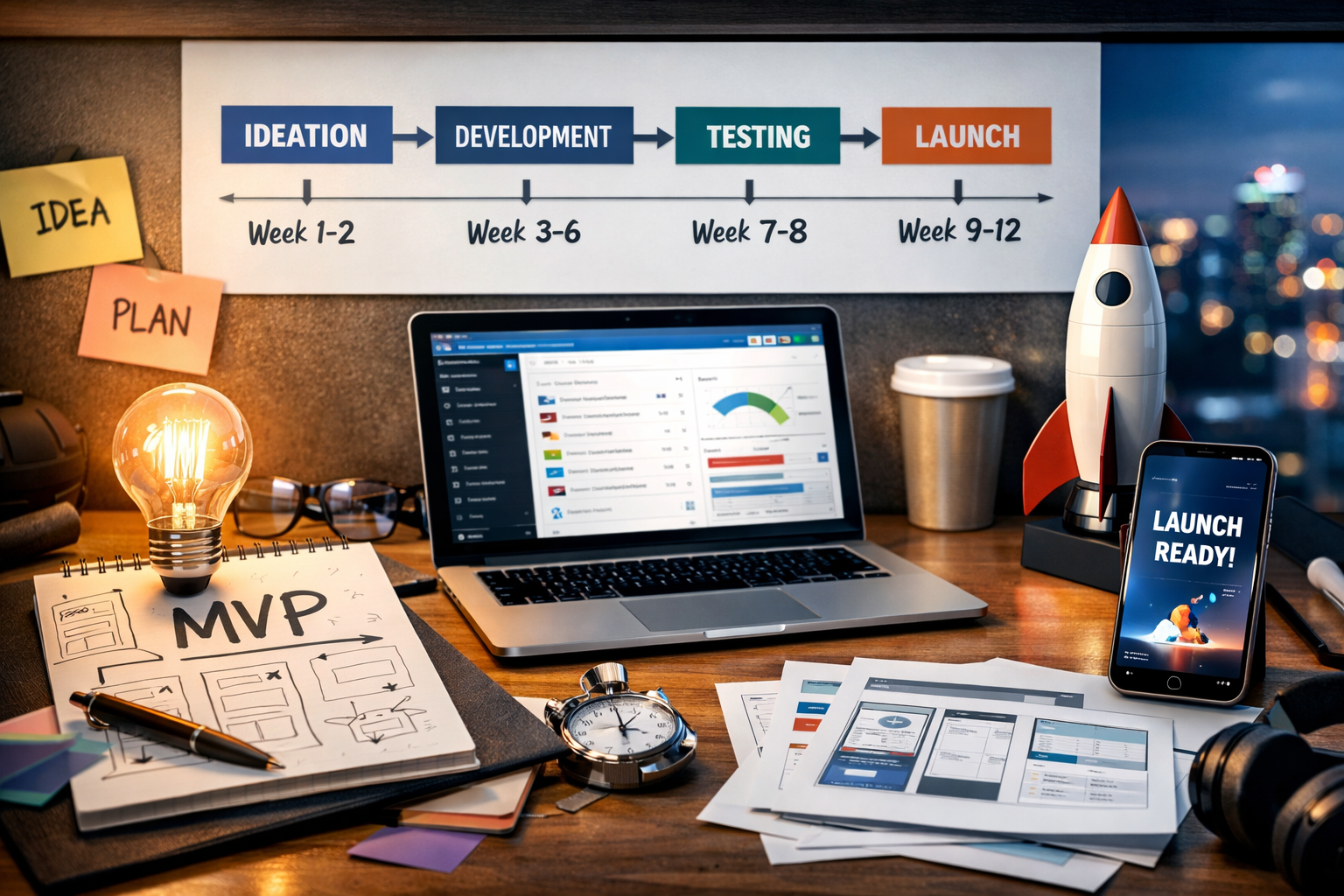
A typical 8-12 week timeline looks like:
- Week 1-2: Architecture setup, database schema, core data models
- Week 3-4: Authentication, user accounts, basic CRUD functionality
- Week 5-6: Core feature development, API endpoints, frontend integration
- Week 7-8: Additional core features, refinement, early testing
- Week 9-10: Bug fixes, performance optimization, security hardening
- Week 11-12: Final polish, beta user testing, launch preparation
Automate testing and deployment. Set up continuous integration from day one. Every commit triggers automated tests. Passing tests deploy automatically to a staging environment. This prevents manual testing bottlenecks.
Step 7: Launch and Collect Feedback
Your MVP is ready. Now you launch to your 5-10 early adopter users per persona.
Launch quietly first. Not to the public. Not to a massive audience. Launch to your identified early adopters. Get them using the product. Sit with them. Watch them use it. Ask them what's broken, what's confusing, what's working.
Set up analytics immediately. Google Analytics for web traffic. Custom event tracking for core actions: created a task, assigned a task, completed a task. Which features are used? Which features are ignored? You'll be shocked at how users interact with your product differently than you expected.
Create a feedback loop. Weekly feedback sessions with 1-2 early adopters. Ask them: What's working? What's painful? What would make this 10x better? Listen more than you talk. Don't defend design decisions. Understand the problem from their perspective.
Measure the core metric. For a task management tool, maybe it's "users completing tasks daily." For a SaaS tool, it might be "users returning 3+ times per week." Define one metric that indicates whether your MVP is solving the core problem. Track it obsessively.
Step 8: Iterate Based on Data
You've launched. You've collected feedback. You have analytics. Now you decide: pivot, persevere, or adjust.
Look for the signal. One metric above all: are early adopters actually using this product to solve their problem? Are they using it regularly? Are they talking about it? If yes, you have a signal. That signal means it's time to expand the user base.
Don't build every feature request. Users will ask for features they don't actually need. They'll ask for integrations they'll never use. Look at the data instead. If 90% of users never open the notification settings, deprioritize notifications. If no one uses the mobile app, don't build it yet.
Focus on retention and engagement. New user acquisition is easy. Keeping users and having them return is hard. An MVP that gets 100 users but retains 80 of them is better than an MVP that gets 500 users but retains 50. Focus on retention first.
Plan your next phase. Based on feedback and metrics, what's next? Maybe you add offline sync. Maybe you build a mobile app. Maybe you add team collaboration features. But you build the next thing informed by data, not by your original vision.
Common MVP Mistakes to Avoid
Building too much. The most common mistake. Founders spend six months building 50 features only to discover that users only care about three of them. Every feature you don't build is a week you can spend elsewhere.
Not talking to users early. Some founders finish their MVP and then try to find users. Wrong approach. Talk to users now. Launch to five users. Get feedback. Adjust. Launch to 50 users. Repeat. You're building for users, not for yourself.
Picking the wrong tech stack. Don't use the latest, coolest technology. Use the technology that gets you to market fastest. If that's no-code tools, use them. If it's a tried-and-tested framework, use it. Boring technology is fine. Fast shipping is the goal.
Ignoring security and privacy from the start. Don't bolt security on later. Use HTTPS from day one. Hash passwords properly. Don't store sensitive data in plain text. Security is table stakes, not optional.
No analytics from the beginning. You need to understand how users actually interact with your product. Set up Google Analytics and custom event tracking from the first day. Data informs iteration.
Waiting for perfection before launch. Your MVP will have bugs. The design won't be perfect. The performance isn't optimized. That's okay. Launch anyway. Real user feedback is better than a month of speculation.
How Much Does an MVP Cost?
MVP costs vary significantly based on complexity, team composition, and geography. A simple web application built by a freelancer might cost $5,000-15,000. A team-based development project typically ranges from $20,000-50,000. More complex systems with significant custom logic might be $50,000+.
Factors affecting cost include: technical complexity, platform requirements (web vs mobile vs both), design custom work, infrastructure setup, and timeline. Using templates and UI kits reduces cost and time. Outsourcing to development teams in lower-cost regions affects budget but can delay communication.
The ROI calculation is what matters. If an MVP costs $30,000 and you gain 10 paying customers at $500/month, you've recovered the investment in six months. That assumes you don't pivot. That assumes the product works. Most founders underestimate the value of launching quickly to find out.
Frequently Asked Questions
What is an MVP and why is it important?
An MVP (Minimum Viable Product) is the most basic version of your product that solves the core problem for early users. It's important because it allows you to validate your business idea with real users before investing heavily in full development, reduce time-to-market, minimize financial risk, and gather feedback to inform future development priorities.
How long does it take to build an MVP?
Most MVPs can be built in 6-12 weeks with a focused team working on core features only. Timeline depends on project complexity, team size, and technical requirements. Simple web applications might take 6-8 weeks, while more complex systems may require 10-12 weeks. Using modern frameworks like Next.js, no-code tools, and pre-built components can significantly reduce development time.
How much does it cost to build an MVP?
MVP costs vary widely depending on complexity and team composition. A simple web application built by a freelancer might cost $5,000-15,000, while a team-based development project typically ranges from $20,000-50,000. Factors affecting cost include technical complexity, platform requirements (web vs mobile), design custom work, and infrastructure needs. Using templates and no-code platforms can impact the budget significantly.
Should I hire a development team or use no-code tools for my MVP?
The choice depends on your product requirements, timeline, and budget. No-code tools like Bubble or FlutterFlow are ideal for simple applications with limited customization needs and can launch faster. A development team provides more flexibility, scalability, and the ability to handle complex technical requirements. For most tech-driven products that need custom logic or integrations, working with experienced developers yields better long-term results despite higher initial costs.
Ready to validate your idea with an MVP? We've helped founders build and launch MVPs that gain traction with users. The key is focusing on the core problem, building with a laser-focused feature set, and launching early to get feedback. Explore our web development and MVP services or reach out to discuss your product idea.
Building an MVP is a discipline of constraints. You can't build everything. You must prioritize ruthlessly. You must ignore distractions. You must launch imperfect. But you launch with something real that solves a real problem. That's when you learn. That's when your product starts becoming what customers actually need.
The founders who succeed are the ones who ship early, gather feedback continuously, and iterate based on real user behavior. Those who wait for perfection, who second-guess their decisions, who build features in isolation, those are the ones who run out of money before finding traction.
If you're building an MVP and need technical guidance, architecture decisions, or a development team to help you ship on schedule, let's talk about your project.
Ready to Build Your MVP and Launch Your Product?
We help founders and product teams build focused, market-ready MVPs in 8-12 weeks. Let's discuss your product idea, validate the core problem, and create a development roadmap that gets you to launch quickly.
Launch Your MVP →